


Nextbase Piqo 2K Dash Cam Review: Value and Simplicity


Dash cams are a massive business. Originally bought for peace of mind and recorded proof of any sort of on-road incident, dash cams have become so much more. Many now double as theft deterrent security cameras, active safety assist systems, and even remote monitors. But, as more advanced functions are bundled into dash cams, prices continue to creep up.
Thankfully, for those operating on a tighter budget, not all dash cams have become overtly tech-laden and expensive. Some options, like the Nextbase Piqo, still feature a good chunk of technology but are much more affordable. The Piqo 1K starts at a price of $129.99 while the Piqo 2K retails for $149.99.
PROS | CONS |
|---|---|
Value | Lacks External Screen |
Easy of Use | Some App Connectivity Issues |
Image Quality |
To see what kind of value and quality the Nextbase Piqo 2K offers, the manufacturer reached out to us and offered a unit free of charge to test and evaluate.
Nextbase Piqo 2K Specs

As the name suggests, the Piqo 2K has the better quality resolution of the two models, specifically the ability to record in 2K. It has 2560 x 1440p resolution, which the company claims allows for clearer images of details like road signs, license plates, and the surrounding environment. The 2K also has a 145-degree viewing angle which is a minor increase over the Piqo 1K with a 140-degree viewing angle.
To keep costs down, the Piqo does not have a rear-mounted screen for the user to see directly what the camera is recording. That can be achieved through the app, but more on that later. The Piqo 2K also lacks image stabilization and a polarizing filter, but does have enhanced night vision capabilities.
During our test, we found image quality to be quite crisp and easy to read license plates as well as roadside signs. The stabilization didn’t seem to be an issue, but our tester, a 2014 Subaru Forester, does have a softer ride compared to some sportier cars. Night images were also clear, considering the camera’s 2K capture technology and price point.
Nextbase Piqo 2K Features
To ensure accuracy with road speed and location, the Piqo 2K is equipped with a 10Hz GPS that updates at a rate of 10 times per second. There is also an enhanced G Sense+ G-force sensor, which the brand claims offers great sensitivity and precision in detecting sudden impacts or sharp movements. Luckily, I didn’t get to test the accuracy of the sensor in a real-world impact, but unlike many competitors, I also did not receive countless false impact alarms, which is a huge plus in my books.
Other standard functions include Smart Parking (security system), Guardian Mode Lite (for when others drive your vehicle), and Witness Mode Lite (text message distress function). There’s also an optional $4.99 monthly plan that adds on Emergency Response in case of an incident, as well as 180 days of cloud storage and an additional 2 years of warranty protection.
The camera itself has a singular button on the back that is used for a variety of functions, depending on whether the vehicle is in motion or not. When in motion, the button has a primary function – to lock in specific video clips. See something on the road, or record an incident not involving your vehicle? Hit the button once, and the video file is now locked and won’t be overwritten. Simple as that. I wish more dash cam record functions were this straightforward.
Installation

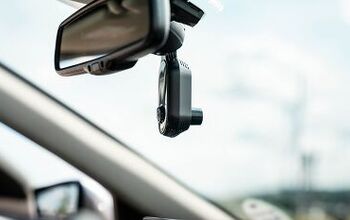
Installing the Nextbase Piqo 2K is fairly straightforward. Like most dash cams, it mounts to the front windshield, and a cord is then run to a USB-C port. If installing in an older car like mine, the Piqo comes with a 12V adapter that contains two USB-C ports.
There are three ways to mount it to the windshield. It can be directly mounted onto the glass using the attached sticky mount pad. For those who frequently change cars like me, it can be mounted using the provided clear plastic pad that suctions onto the windshield, and then the Piqo is attached to it. This allows easier reinstallation and does not leave any sticky residue on the windshield afterwards.
Finally, there is the Piqo ClickMount. The base of the ClickMount attaches directly to the windshield, like in the first installation example above. But the actual Piqo dash cam then clicks onto the base for easy, consistent install and removal. Those who plan to use the camera in two cars, for instance, could have a ClickMount base in each vehicle.
Nextbase App Integration

Like most reputable modern dash cams, the Nextbase Piqo has an in-depth accompanying app. This is important for the Piqo because, as mentioned, there is no exterior screen on the camera itself. Through the app, there is a camera setup screen so the user can properly position the camera to capture the road ahead in frame.
The Piqo connects to any smartphone running at least IOS 15 or Android 8, through QuickLink Wi-Fi 2.4Ghz and Bluetooth 4.1. I did have trouble getting my phone to connect to the camera initially, but it was more of an issue on my phone’s end. Once connected, updating the Piqo 2K firmware took a few attempts as well before it successfully installed the file. After that, though, it was smooth sailing.
More than just for camera orientation, the App can also be used to download/view all video files on the camera’s SD card, customize the settings for the various modes like Witness, Parking, and Guardian, and much more.
Nextbase Piqo 2K Dash Cam

The Verdict: Nextbase Piqo 2K

The Nextbase Piqo 2K delivers exactly what is promised: a dash camera that is simple to use, affordable, and delivers good quality images. It’s not the sharpest image on the market, or laden with the most features, but the price is very attractive for what is offered, and Nextbase is a known quantity in the dash cam world. Some may not like the lack of an external screen, but for someone like me that only needs a dash cam for recorded proof in the event of an incident, it more than meets my needs.
Become an AutoGuide insider. Get the latest from the automotive world first by subscribing to our newsletter here.
A 20+ year industry veteran, Mike rejoins the AutoGuide team as the Managing Editor. He started his career at a young age working at dealerships, car rentals, and used car advertisers. He then found his true passion, automotive writing. After contributing to multiple websites for several years, he spent the next six years working at the head office of an automotive OEM, before returning back to the field he loves. He is a member of the Automobile Journalists Association of Canada (AJAC), and Midwest Automotive Media Association (MAMA). He's the recipient of a feature writing of the year award and multiple video of the year awards.
More by Mike Schlee




Comments
Join the conversation